What moves, and what stays
The import reads your links from Bitly’s API, or from a CSV export you download from Bitly. Each link arrives with its destination and title. Its old click count can come along too, and the link’s page then shows it as clicks before the import.
Two kinds of Bitly link behave differently.
- Links on your own branded domain. Point that domain at Shorthop and the same addresses keep working. From then on their clicks show up in your own statistics.
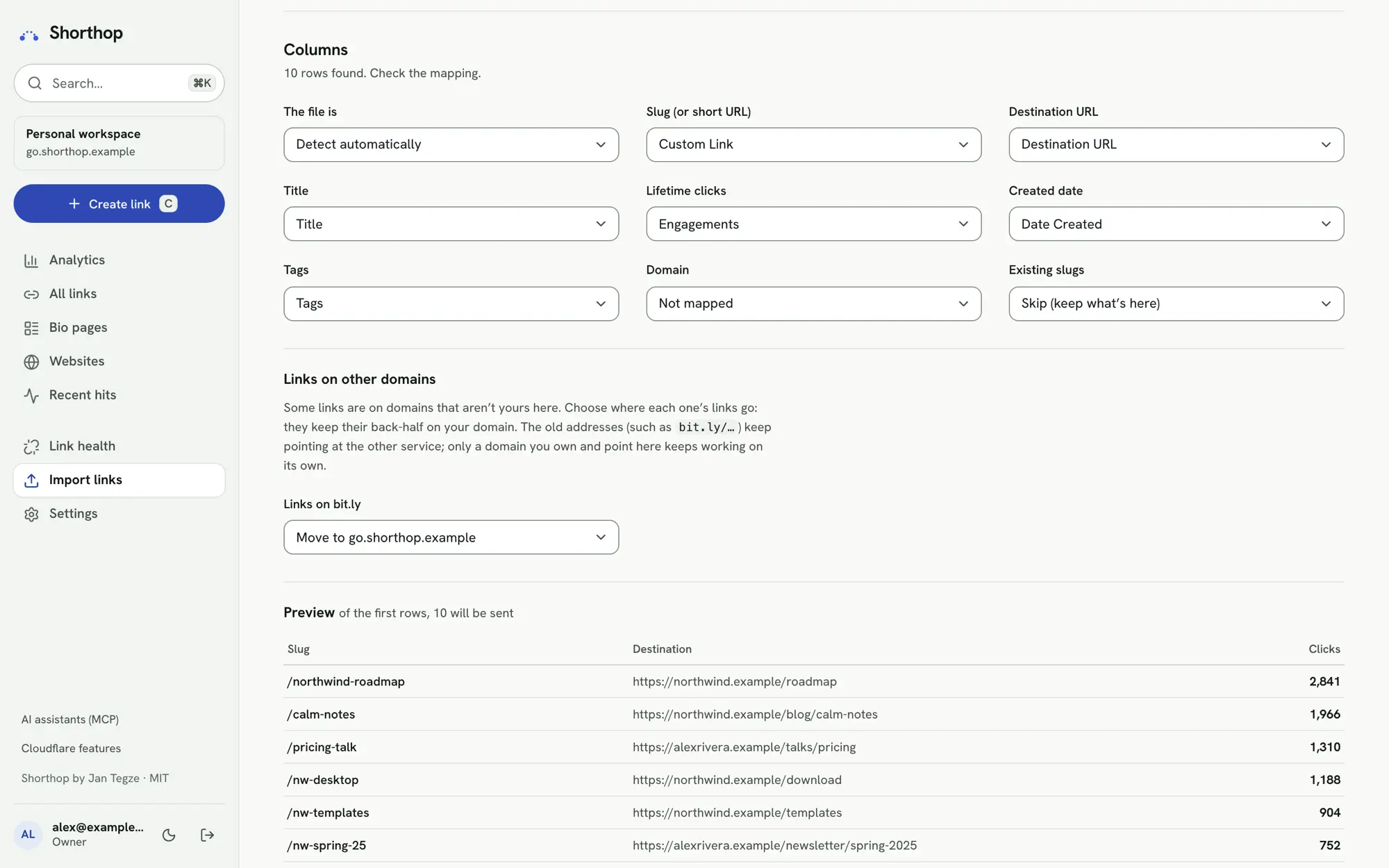
- Links on bit.ly. The import moves them to your domain with the same back-half, so
bit.ly/<back-half>becomesgo.example.com/<back-half>. The old bit.ly addresses keep pointing at Bitly. Only a domain you own and point at Shorthop keeps working on its own.
Imported links keep their http:// destinations and get no UTM tags, so they redirect exactly as before. New links you create must use https://.
Bitly’s plans next to Shorthop
With a hosted shortener, the plan decides how much history you see and how often you can change a link. Here is what Bitly’s pricing page lists, beside what Shorthop does in your own account.
| Topic | Bitly’s plans | With Shorthop |
|---|---|---|
| Click history | The Free plan card lists no click and scan data. Core lists 30 days, Growth 4 months, Premium 1 year. | Daily statistics stay in your own D1 database until you delete them. Individual clicks are kept for about 90 days. |
| Changing where a link goes | Redirects are counted per month. The comparison table lists none on Free and 5 a month on Core. | Change any link whenever you like. Workers Free allows 1,000 link saves a day. Every version is kept and can be restored. |
| Your own domain | Branded links and a complimentary custom domain are listed from Growth up. | Your own domain on any Cloudflare plan, Free included, as long as its DNS is on Cloudflare. Several domains are fine. |
| New links | Free: 5 short links and 2 QR codes a month. Core: 100 and 5. | No monthly count. Workers Free allows 1,000 link saves a day. |
| Price | Free, then Core at $10 a month (annual only), Growth at $29 and Premium at $199. | Free and MIT-licensed. Most personal use fits Workers Free; Workers Paid starts at $5 a month. |
Bitly: plan cards and comparison table on bitly.com/pages/pricing, checked . Cloudflare: Workers pricing, checked the same day. Plans change, so check both pages before you decide.
Shorthop also does things this table leaves out. It follows a click to the payment it led to and shows revenue per short link, and it counts visitors without cookies or stored IP addresses.
Move in four steps
This is the path in the admin, with no terminal. You need Shorthop installed first: see Install Shorthop on Cloudflare Workers.
- List your branded short domain in
SHORT_DOMAINS, but don’t add its route yet. Its DNS stays with Bitly for now, so nothing changes for your visitors. - Open Import links → Another shortener’s API, pick Bitly and paste an access token. Bitly’s API docs send you to app.bitly.com/settings/api to generate one. Shorthop uses the token only while it reads your links and never saves it. You can upload Bitly’s CSV export instead: Shorthop recognises its columns.
- Choose where the bit.ly links go. They keep their back-half on your domain. Check the preview, then import.
- Check the destinations in Link health. Then add the domain’s route and deploy. The domain switches over with every link and printed QR code on it still working, now counted in your statistics.
Bitly’s token page from its API authentication docs, checked . The pricing page lists 1,000 API requests a month on Bitly’s Free plan. The import reads 100 links per request. Include lifetime clicks costs one more request per link.
On Workers Free, each imported link is one KV write, and Cloudflare allows 1,000 KV writes a day (KV pricing, checked ). Import up to 1,000 links a day, or move to Workers Paid for a large account.
Printed QR codes
Will my Bitly QR codes keep working? Codes on your own branded domain will. Import the links, point the domain to Shorthop, and the same addresses resolve. Codes that contain a bit.ly address keep pointing at Bitly.
For new codes, Shorthop’s QR studio has colours with a contrast check, a logo, frames with a caption and a live scan test. It exports SVG or PNG up to 4096 px. Scans count as their own source, and you can change where a printed code goes without reprinting it.
Rehearse it first
If you are happy in a terminal, you can try the move on a local copy before touching your domain. Save your links as a JSON list, import them into the local dev server, then compare every slug with Bitly:
npx tsx scripts/import.ts --base http://localhost:5173 --data data/links.json
npx tsx scripts/check-slugs.ts --base http://localhost:5173 --data data/links.json --live --probe
--live asks the old service for each slug. --probe shows how it treats letter case, trailing slashes and query strings. When you move production this way, the domain switches to Shorthop on deploy, so run the import straight after: until it finishes, visitors see the not-found page. The whole order is in moving from another shortener.
Rebrandly, Short.io and Dub
They import the same way, by API key or by their CSV export. Links on their own domains (rebrand.ly, short.gy, dub.sh) move to your domain with the same back-half, and their old addresses keep pointing at the old service. Any other CSV works too: only a slug and a destination are required.