From click to payment
- Someone clicks. A short link to a site you track carries a signed click token,
?sh_c=, naming the click. It holds no personal data and is valid for 7 days. - They land on your site. One script tag of about 8 KB records visits, pages and goals. It reads the token on the first page, removes it from the address bar and credits the visit to the link.
- They pay. Your payment provider sends a verified webhook. Shorthop matches the payment to the visit that led to it and records how sure the match is.
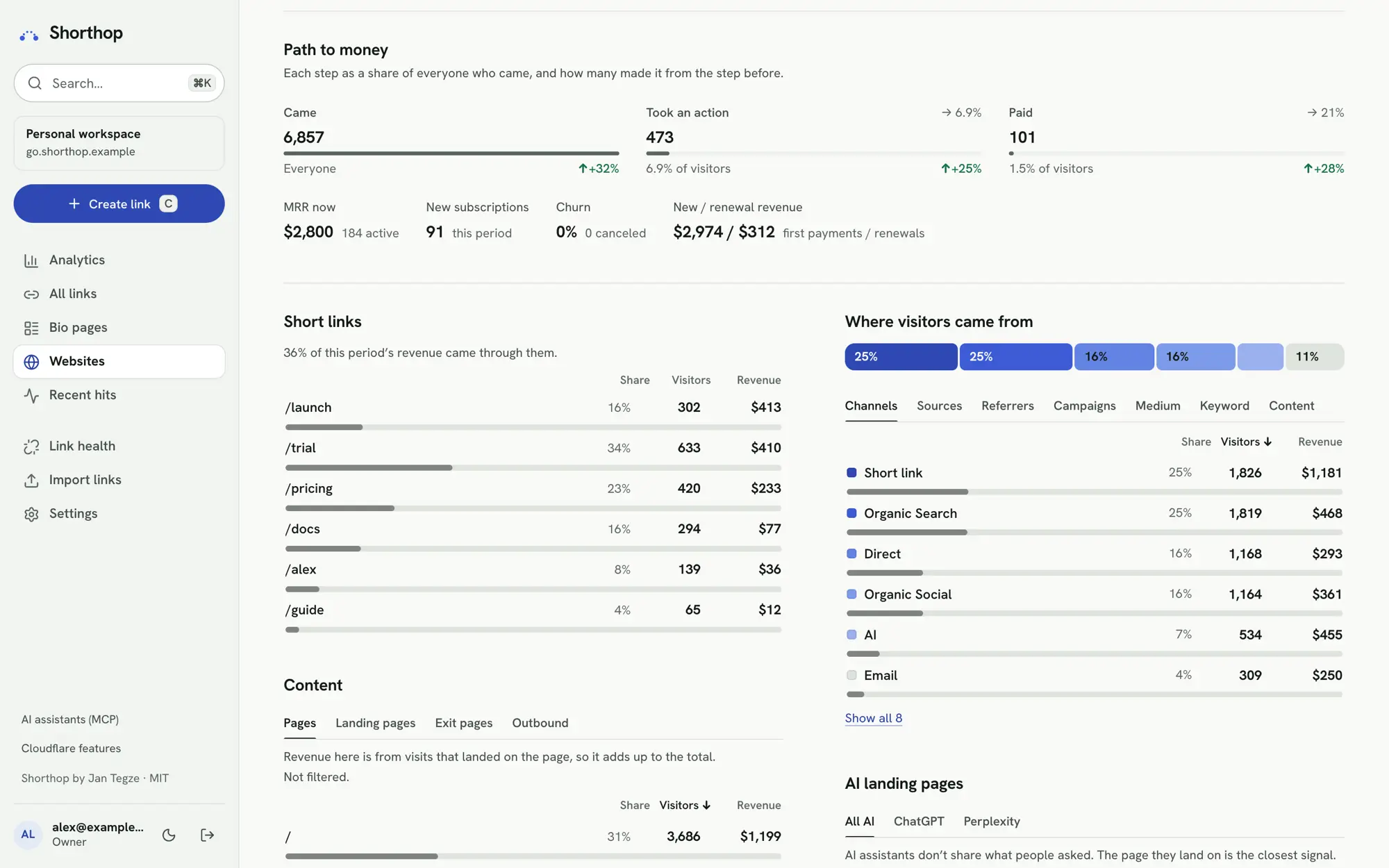
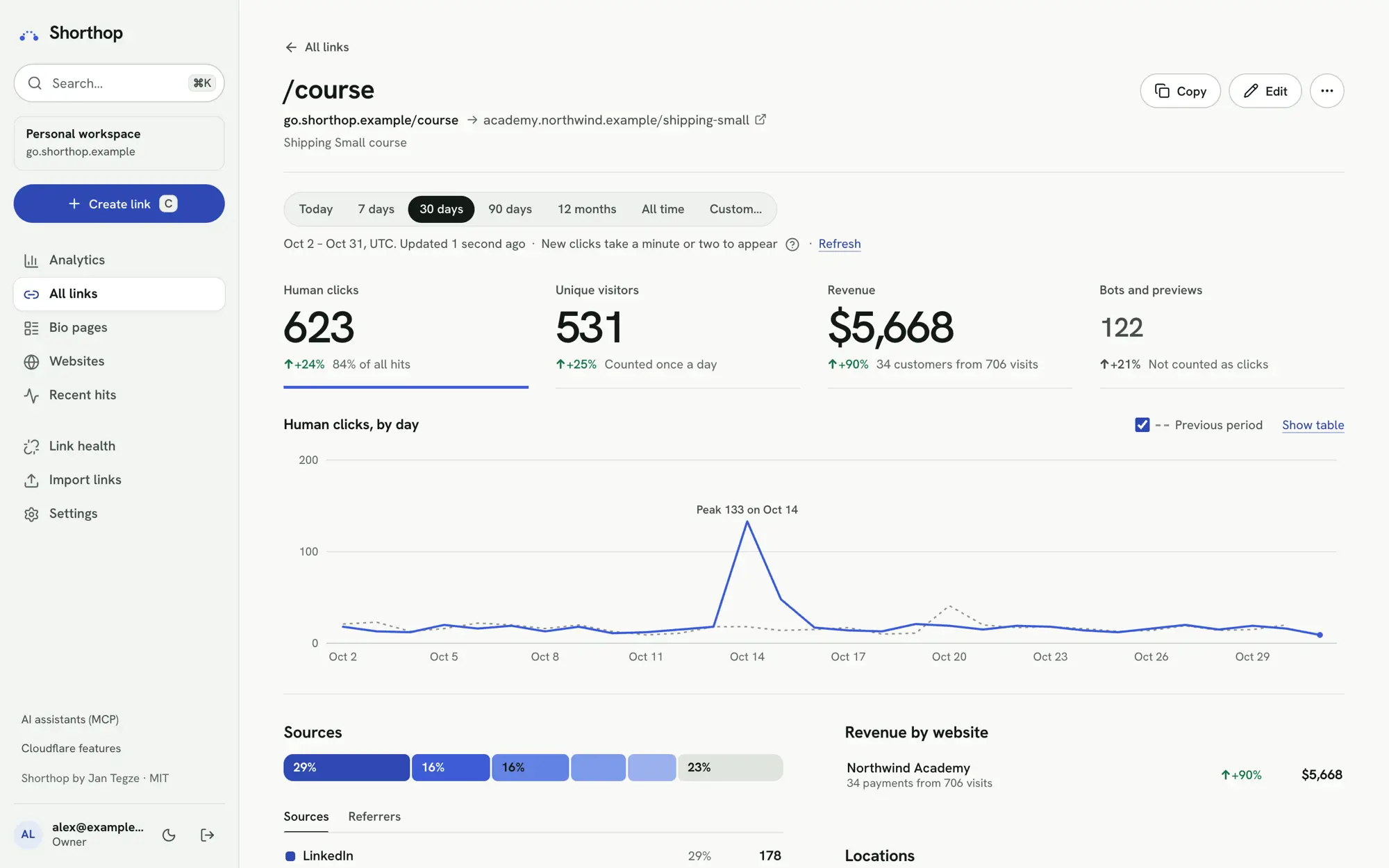
- You see it on the link. Each link shows the visits and revenue it brought. Revenue by channel, campaign, short link, landing page, country or device adds up to the total.
Payment providers
Stripe, Paddle, Lemon Squeezy, Dodo Payments, Creem, Gumroad, FastSpring and PayPal send verified webhooks. In the site’s Settings & setup, switch on the ones you sell with, follow the steps for each and press Check connection.
Every webhook is checked with the provider’s signing secret before anything is saved. PayPal’s is checked through PayPal’s API. Billing that isn’t on the list can send payments from your server to the API (POST /api/sites/<id>/payments). Past payments can be imported from every provider except PayPal.
Links straight to a checkout
Some links skip your website. A short link to a Stripe Payment Link, or to a Lemon Squeezy, Dodo, Creem or Gumroad checkout, gets a random reference added to the checkout address. When the provider’s webhook brings that reference back with a payment, the sale is credited to the link.
These clicks never count as website visits. Shorthop keeps the reference for 90 days, with the link, the source, the country, region and city, and the device, operating system and browser. It never keeps an IP address or a visitor hash. Paddle, PayPal and FastSpring links can’t carry a reference in the address, so they need a website in between. Creem is the newest: the changelog notes its reference parameter is documented by Creem but not yet confirmed with a real order.
How sure each match is
Shorthop tries the surest evidence first and stops at the first match. Each payment records what it was matched by and how sure the match is.
| Matched by | How sure |
|---|---|
| The visit reference passed through checkout, or a checkout reference from a short link | High |
| The page people return to after paying, with the script on it | High |
| The same customer or subscription as an earlier matched payment | As sure as that earlier match |
| An email your server reported for the visitor | Medium |
| An email the visitor’s browser sent | Low |
| Checkout timing: one visit went to checkout shortly before, and no other payment was around it | Low |
When several visits went to checkout around the same time, Shorthop doesn’t guess. The payment stays unmatched and says why: pass the visit reference through checkout to tell them apart.
Which visit gets the credit
A customer may visit more than once before buying. Each payment is credited to exactly one visit, so revenue by source, page or link adds up to the total. Each site picks the rule:
- Last non-direct visit (the default): the latest visit that came from somewhere. A direct visit counts only when there is nothing else.
- Last visit: the visit just before the payment, wherever it came from.
- First visit: the visit that first brought the customer.
The rule looks back 7, 30, 60 or 90 days (30 by default). Change it, and every matched payment is credited again. On a cookieless site the visitor ID changes every day, so only the visits of the payment’s day can be connected. Read what is recorded before you choose how a site tells visitors apart.
Subscriptions, refunds and currencies
Subscriptions show MRR, churn, and new against renewal revenue. Refunds and disputes follow their charge. Amounts are converted to the site’s currency at the day’s ECB rate.
You can follow a customer’s journey visit by visit, compare how buyers and non-buyers read your pages, and see the path to purchase: time to buy and visits before buying. Customer value is shown by the source that first found them.
Who sees the money
Only people with the See revenue permission see payments, revenue and customers. A shared statistics page for a sponsor never shows revenue. A campaign report shows revenue per currency only if you turn it on.
For alerts, you can get an email for each payment and a daily summary, or a signed site.payment webhook to your own tools.
Set it up
- Install Shorthop and add your short domain. See Install Shorthop on Cloudflare Workers.
- Open Websites and add your site with its domains.
- Put the script in the
<head>of every page, including the checkout and thank-you pages. Use your own short domain and the site’s ID:
<script defer src="https://go.example.com/_t/script.js" data-site="SITE_ID"></script>- In the site’s Settings & setup, connect your payment provider, add the webhook it shows you at the provider, and press Check connection.
- To read the numbers, set
CF_ACCOUNT_IDand add aCF_ANALYTICS_TOKENsecret with Account Analytics Read. Without it, visits are recorded but the dashboard can’t show them.
The site’s setup page shows these steps with your values filled in, for plain HTML, Next.js, WordPress, Shopify, Webflow, Framer, Wix, Squarespace, Ghost and anything else that lets you add a tag to the page head. It checks live that the script arrives. If your site has a Content-Security-Policy, allow your short domain in script-src and connect-src. The full steps are in websites and revenue.